Real Time Stocks Track & Alert
- 4.0
- Rating
- 100.00K
- Installs
- Free
- Price
 Analysis by App-foxy
Real Time Stocks Track & Alert is the kind of finance app I would open when I want a quick market check without turning my phone into a full trading workstation. Its focus is straightforward: follow stock prices, review charts and market news, and keep an eye on changes that matter to me. I found the experience most useful as a compact monitoring tool rather than as a complete replacement for a broker’s app.
That distinction matters. The app can help me decide when to investigate a company more closely, but I would not treat a price screen, chart, or news headline as a complete investment decision. For me, its value comes from reducing the effort needed to stay aware of several symbols at once. The developer is Dajax LLC, and the app is available free of charge, with optional purchases ranging from $1.99 to $89.99 per item.
How the app feels when I use it for market monitoring
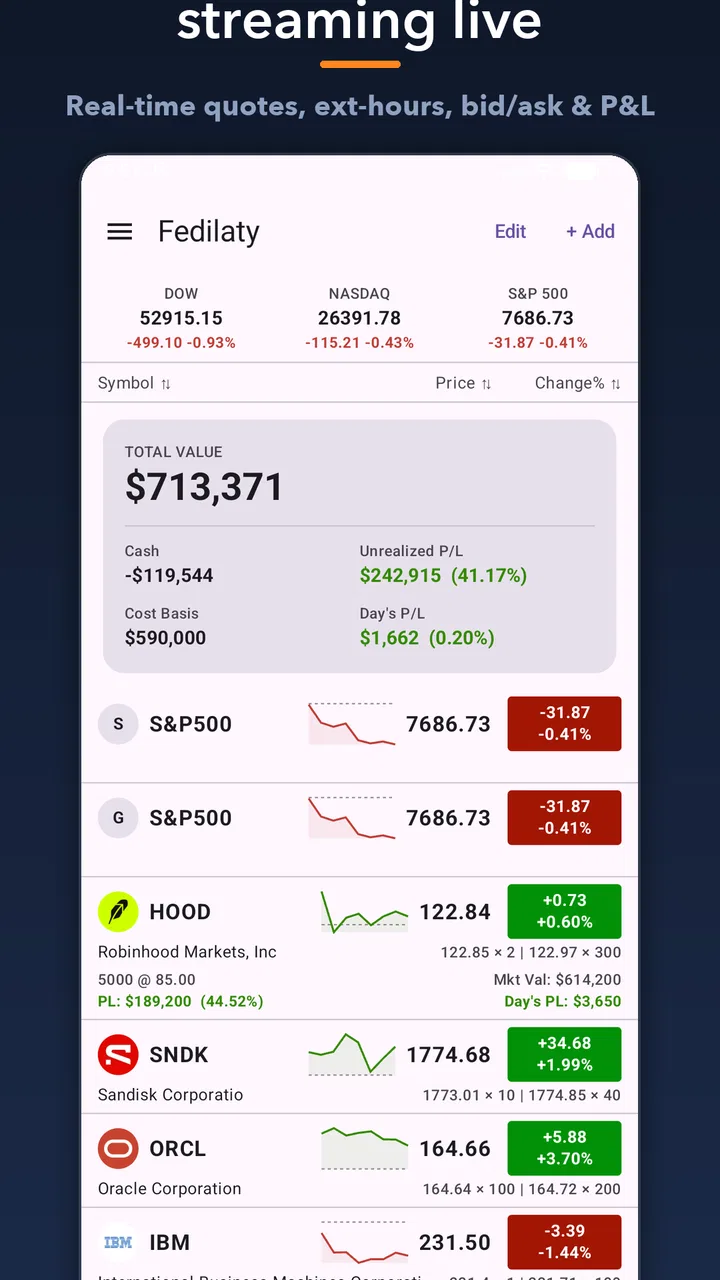
The first thing I noticed is that the app is built around observation. I can check a quote, look at a price movement, scan a chart, and use market news to decide what deserves further attention. That makes it a natural fit for someone who already has a watchlist or a few companies they follow regularly.
You May Also Like

 Blood Strike: 2.5 Anniversary
Blood Strike’s Loadouts Turn Every Drop Into a Tactical Gamble
A close look at Blood Strike’s custom loadouts: how fast access to signature weapons reshapes its battle royale rhythm, rewards preparation, and narrows the gap between fights.

 Pandora - Music & Podcasts
Pandora’s Music Is Easy to Start, but Harder to Recover
Pandora’s strength is its low-effort path from a seed to a station. Its weak spot is how much confidence it asks you to place in connection, setup, and quiet recovery.

 8 Ball Pool
 Is Built on Rivalries, Rematches, and Routine
A close look at the rivalries, rematches, shared routines, and unanswered safety questions that turn a quick pool match into a persistent mobile community.

 Samsung Music
’s Quiet Strength Is Playing What You Already Own
Its reach comes less from spectacle than from dependable access to a personal library. That simplicity is both the app’s strongest retention engine and its ceiling.

 AccuWeather: Weather Radar
AccuWeather Review: A Quick, Clear Forecast for Everyday Decisions
For everyday plans, the best forecast is the one you can understand quickly. AccuWeather makes rain timing, radar, and local conditions easy to act on, with a few trade-offs.

 Hill Climb Racing
Why Hill Climb Racing Still Turns Crashes Into One More Run
A tiny car, a bumpy hill and one more upgrade: Hill Climb Racing keeps resurfacing because its simple chaos makes every near-miss feel personal.
More From Our News Desk



I would describe the layout as practical rather than luxurious. It is not trying to teach investing from the ground up, and it does not replace the research process that comes before buying or selling. Instead, it puts several familiar market tools in one place. The short description, “Real Time Stocks,” captures the main purpose, while the broader feature set points toward tracking, alerts, quotes, charts, and news.
In everyday use, I might check a company before work, glance at the same symbol during a lunch break, and review the chart again after a major market move. That routine is more convenient than opening several separate sources. The app becomes especially useful when I want awareness without immediately taking action.
My main recommendation is to use it as a monitoring layer, not as the sole source for a financial decision. A quote can tell me what the market is doing, but it cannot explain whether a company is healthy, whether a move is temporary, or whether a trade fits my risk tolerance.
A sensible role beside a brokerage account
I see the strongest workflow as a two-step arrangement. I can use this app to watch symbols, notice unusual movement, and read the related market context. If I decide that something deserves action, I can then verify the details inside my brokerage account or another trusted research source before placing an order.
This separation is useful because a tracking app and a trading platform serve different purposes. A broker normally handles orders, account balances, holdings, and transaction records. Real Time Stocks Track & Alert is more appealing when I want a lighter interface for following prices and alerts without mixing every account function into the same screen.
That also explains who may want to skip it. If I need advanced portfolio accounting, tax documents, order types, research reports, or direct trading in one place, I would look first at a brokerage application. If I only want a simple quote for one company once in a while, the built-in finance tools on a phone may be enough. This app makes more sense for someone who follows multiple symbols and wants a dedicated market-watching habit.
Trust begins with what I can actually verify
Finance apps deserve a more careful look than ordinary utility apps because the information they display can influence real money. I do not judge trust by visual polish alone. I pay attention to what the app asks me to allow, what choices are visible, and whether I can use its basic functions without surrendering more control than I expected.
Real Time Stocks Track & Alert is rated for Everyone, which makes it broadly accessible, but that age label is not a guarantee of financial suitability. A young or inexperienced user could still misunderstand a chart or act on a sudden price change. I would introduce the app as an observation tool and explain that market information is not the same thing as personalized advice.
The app has been available since February 17, 2013, and its current version is 7.1.2. Those details suggest an established product rather than a newly launched experiment, but longevity alone does not answer every privacy or reliability question. I still check the permissions shown on my own device, read any prompts carefully, and avoid assuming that a familiar finance interface automatically has access to only harmless information.
The public response is reasonably positive, with a 4.0 average from around 7.6 thousand ratings and roughly 1.9 thousand written reviews. It has also passed the 100 thousand install mark. I treat those figures as signs that people are using the app, not as proof that it will suit my workflow or that every quote and alert will behave exactly as I want.
Permissions, accounts, and visible choices
When I install a finance app, I look for a clear boundary between viewing market information and connecting sensitive financial accounts. I do not want to confuse a watchlist with a portfolio connection, or an alert with an authorization to trade. My practical rule is simple: I grant only the access needed for the feature I am actively using.
For this app, that means I would review each permission prompt in context rather than approving everything quickly. If the app asks to send notifications, I decide whether alerts are genuinely useful. If I do not want frequent interruptions, I keep them limited or disabled through the phone’s controls. Notification access is not the same as access to a brokerage account, and keeping that distinction clear helps me stay in control.
I would also avoid entering brokerage credentials into a tool unless I fully understood why they were required and how the connection worked. For a tracking workflow, I can often keep the app separate from my actual trading account. That separation reduces the consequences of losing access to the app or changing my mind about using it.
The free download makes it easy to try the core experience before deciding whether it belongs in my routine. Optional purchases are available, so I would pay attention to the purchase screen and confirm what an upgrade changes before accepting it. The wide range, from $1.99 to $89.99 per item, is a good reason to slow down rather than assume every paid option is a small one-time convenience.
Data-sensitive moments I would handle carefully
The most sensitive moment is not necessarily opening a chart. It is any point where the app asks me to identify myself, connect an account, enable persistent notifications, or approve a purchase. Those moments deserve more attention because they can affect privacy, spending, and the way I respond to market events.
I am particularly cautious with alerts. They can be helpful when I am tracking a price level, but they can also encourage impulsive behavior. A sudden notification may make a market move feel urgent even when I have not checked the broader context. I prefer to define a small number of meaningful alerts and treat each one as a prompt to research, not an instruction to trade.
A useful habit is to write down why I am watching a symbol before I create an alert. Maybe I want to follow a company through an earnings period, compare two businesses in the same industry, or notice when a long-term holding moves sharply. That small step prevents the alert system from becoming a stream of emotional triggers.
I also avoid putting private financial details into notes, screenshots, or any field that is not clearly necessary. A watchlist can be informative without revealing my account balance, investment plan, or personal identification. Keeping the app’s role narrow makes it easier to decide what information belongs there.
Charts and news need interpretation, not blind confidence
The combination of charts, quotes, and news is convenient, but it can create a false sense of completeness. A chart shows price behavior over a selected period; it does not automatically explain the reason behind that behavior. News can provide context, but a headline may be incomplete, delayed, or focused on a detail that does not matter to my long-term decision.
When I use the chart, I first check the time frame before drawing a conclusion. A short movement can look dramatic when viewed closely and insignificant when viewed over a longer period. I then compare the price change with the related news and, when the decision matters, verify the information through a separate source.
One of the more useful workflows is to use the app for discovery rather than confirmation. If an alert draws my attention to a symbol, I can note the move, read the available context, and then investigate the company’s filings, financial results, or official announcements elsewhere. This keeps the app valuable without asking it to perform every research task.
Another practical tip is to separate “interesting” from “actionable.” I may see a sharp price change that deserves a closer look, but that does not mean I should buy or sell. The app is good at helping me notice; judgment still belongs to me.
Who gets the most value from it
I think the app suits casual investors, long-term holders, and market learners who want a dedicated place to follow symbols. It is also useful for someone who does not want to open a brokerage account every time they are curious about a quote. The free entry point makes experimentation easy, while the alert and chart focus can support a more organized watch routine.
For a beginner, I would use it alongside a basic investing glossary or educational source. The interface can show market information, but it may not explain terms deeply enough for someone who has never encountered price movements, chart periods, or market news. I would start with a few companies I already understand instead of filling the watchlist with random names.
For an experienced investor, the benefit is speed and separation. I can keep a lightweight monitoring tool open while reserving my brokerage app for account-specific tasks. The trade-off is that I may need other services for deeper analysis, portfolio performance, dividend tracking, or transaction history.
It is less suitable for a person who wants automated investing, direct order execution, or a complete financial dashboard. It is also not my first choice for someone who becomes anxious when alerts arrive. In that case, fewer notifications—or no notifications at all—may produce better decisions than a more active tracking setup.
A realistic daily scenario
Imagine I own a few shares of a company and want to follow it without checking the market every few minutes. I add the symbol, review its recent chart, and set one alert around a price level that would make me investigate further. During the day, I receive a notification and open the app to see whether the move looks isolated or connected to wider news.
I do not place a trade immediately. Instead, I record what caught my attention, check a second source, and decide whether the event changes my original reason for holding the company. If it does not, I leave the position alone. If it does, I move to my brokerage account only after reviewing the details there. In this scenario, the app saves time while the final decision remains deliberately separate.
That is where I find the product most responsible and useful. It gives me a prompt without taking away my pause. The alert starts a process; it does not finish one.
Handling the free and paid experience
Because the app is free to download, I would begin by testing whether its quote, chart, news, and alert workflow fits my habits. I would not buy an optional feature simply because the app is already installed. Before paying, I would look at the exact item name, the stated benefit, and whether the purchase is a one-time unlock or part of a continuing arrangement shown on the purchase screen.
The presence of purchases does not automatically make the free version poor, but it does mean I should evaluate the app based on what I can actually use without paying. Someone who only needs occasional market checks may find the free experience sufficient. A more active watcher may consider an upgrade if it removes a specific limitation that affects daily use.
I also recommend reviewing notification behavior after any change. If a paid option makes alerts more prominent or expands the number of symbols I follow, I still want to keep the system quiet enough to avoid reacting to every fluctuation. More information is not always better information.
Where it stands against ordinary alternatives
Compared with a phone’s default finance widget, this app offers a more intentional market-tracking environment. A widget is excellent for a quick glance, but it may not give me the same sense of a dedicated watch routine. Compared with a brokerage app, this one is less tied to account activity, which can be an advantage when I want to research without being surrounded by buy and sell controls.
On the other hand, a brokerage app is usually the better choice when I need verified holdings, order execution, account records, or portfolio-level decisions. A specialized research platform may be stronger for company fundamentals and detailed analysis. A news-focused service may provide broader reporting. Real Time Stocks Track & Alert sits between those options: more focused than a simple widget, but not something I would expect to replace every financial tool.
That middle position is both its strength and its limitation. I appreciate the narrower purpose because it keeps routine checks simple. I would not choose it as my only finance app if my needs extend beyond tracking and alerts.
My cautious verdict
After using Real Time Stocks Track & Alert as a market-monitoring companion, I see a useful, focused app for people who want quotes, charts, news, and alerts in one place. Its established presence, free starting point, and dedicated tracking approach make it easy to try without immediately moving trading activity into the same environment.
My trust in it is practical rather than absolute: I keep permissions limited, treat notifications as reminders, inspect purchase choices carefully, and verify important information elsewhere. I also avoid confusing a smooth interface with financial advice. Those habits are not a criticism of the app; they are sensible boundaries for any tool that can influence money decisions.
Choose it if you want organized awareness of the market and are comfortable doing deeper verification yourself. Choose a brokerage app instead if you need trading and account management, or a research platform if detailed company analysis is your priority. For my own use, this app earns a place as a convenient first look—provided I remain the person making the final decision.
FAQs for Real Time Stocks Track & Alert
01What is Real Time Stocks Track & Alert used for?
Real Time Stocks Track & Alert is designed to help investors monitor stock prices and market movements from a mobile device. You can follow selected companies, review current quotes, observe price changes, and receive alerts when a stock reaches a level that matters to you. It is mainly a tracking and notification tool, not a replacement for professional investment advice.
02Does the app provide truly real-time stock prices?
The availability and speed of price updates can depend on the exchange, market, region, and data provider used by the application. Some quotes may be delayed rather than streamed instantly, especially for certain markets or securities. Before making a trade, users should confirm the current price and trading information directly with their broker or another official financial-data source.
03Can I create alerts for specific stocks and price movements?
Yes, the app is centered around tracking selected stocks and setting notifications for important changes. Depending on the supported features, alerts may be based on a target price, a rise or fall in value, or notable market activity. Notification delivery can be affected by phone permissions, battery-saving settings, internet access, and the app’s background activity.
04Does Real Time Stocks Track & Alert allow users to buy or sell stocks?
No, the application should be understood primarily as a market-monitoring and alert tool rather than a complete brokerage platform. It can help you watch prices and identify movements, but placing orders generally requires a separate investment account and broker app. Always review fees, order details, market hours, and execution conditions before submitting a trade elsewhere.
05Is Real Time Stocks Track & Alert free to download and use?
The app may be available to download without an upfront charge, but some functions can depend on advertising, subscriptions, in-app purchases, or limitations within the free version. Pricing and included features may change over time, so check the official store listing before installing. Also review the app’s privacy policy to understand what account, device, or usage information may be collected.
Pros
- Tracks stock prices in real time with quick market updates.
- Custom price alerts help monitor important buy or sell levels.
- Supports watchlists for organizing favorite stocks efficiently.
- Clean interface makes market data easy to scan on mobile.
- Useful for investors who need fast access while traveling.
Cons
- Real-time data may require a subscription or vary by exchange.
- Market coverage can differ depending on your country and broker.
- Frequent alerts may become distracting during volatile sessions.
- Advanced charting and analysis tools may feel limited for experts.
- The app does not replace professional financial advice or research.

Real Time Stocks Track & Alert
Gallery